Showing posts with label Free Wares. Show all posts

Sunday, July 11, 2010

Why not try these Browsers???


When it comes to web browsers, Internet Explorer, Firefox, Opera, Safari, and Google’s Chrome get all the attention. But they’re not the only web browsers on the market, nor are they necessarily the best.
While you’ve probably never heard of Flock, K-Meleon, and Maxthon, these three alternative browsers offer features so innovative that once you try them out, you just might feel compelled to add them to your permanent stable of web browsing tools. Find out why….
FLOCK
Flock bills itself as “the social web browser” and it has more hooks with popular web technologies than any other browser. With Flock’s “Accounts and Services” sidebar, for instance, you can aggregate and communicate with your friends from most of the popular social networking sites while you surf other sites. With the Photo Upload feature, you can either drag photos from your computer or select multiple images from a folder, and Flock will resize them and send them on to Picasa, Photobucket, or TinyPic.
If you have a blog you can add blog entries directly from Flock using the browser’s built-in Blog Editor.
Add links in the side panel to Gmail, Yahoo Mail, and instant messaging in the same Accounts and Services sidebar, and Flock gives you nearly instant access to most of what you’re likely to be doing online today. Log on to a site that offers content or RSS feeds, for instance, and Flock will alert you to their presence, instructing you how to use the orange feed button to add the site to your list of feeds. Flock feels as fast and stable as IE or Firefox. IE users, in particular, will be able to adopt Flock with virtually no retraining, since most of the keyboard shortcuts – including those to access Favourites are identical.
K-MELEON
If what you want in a web browser is speed, along with a healthy dose of customizability, then K-Meleon will be worth your time. This little-known browser was launched specifically to be easy on system resources and therefore speedy where other browsers are not.
Even during installation, K-Meleon gives you the option of installing a pre-loader that promises to increase browser load times by keeping a portion of the browser’s code in memory at all times. Even without benchmarks, complex pages load noticeably faster than with either IE or Firefox, as both graphics and text appear almost simultaneously. Keyboard shortcuts and menus resemble those in Firefox.
A handy sessions menu allow you to save multiple browser tabs to one shortcut, meaning that if you regularly have 10  web sites open, you can reopen them all with one click. K-Meleon allows you to set up multiple user profiles so that each person who uses a computer can have a unique browser set up.
There are the usual browser-specific options that are accompanied by a host of advanced configuration settings, mouse accelerators, bookmark options, and view settings.

MAXTHON
Originally developed in China, Maxthon is different in some immediately noticeable ways, including its interface, which is bereft of the standard title bar, giving you more browser space in which to view web pages. Virtually everything about the interface can be customized. In this “no interface” mode, Maxthon is more Spartan even than Google’s Chrome. The effect makes Maxthon a notable solution for viewing web pages on small notebook screens.
Virtually every feature in the browser is accessible with the keyboard. You can even assign the function keys on your keyboard to open specific web pages, and you can create “web aliases,” which allow you to open a web site or groups of sites merely by typing a few letters or a word into the address bar. A unique Groups menu makes short work of saving a set of open tabs to a single shortcut. The browser also comes with some useful tools, including a full-featured form-filler, a flexible screen capture utility, a “file sniffer” that can help you find the web addresses of videos and a “collector” or notepad feature that can save your thoughts from session to session.
There’s a complete skinning system as well, which allows you to change the look and feel of the browser. Add it all up, and you have a browser that should have the major players taking notice.


COURTESY: GUARDING NEWSPAPERS LIMITED 2010

Wednesday, June 23, 2010

Simulate your hairstyle and choose your haircolor thru your pocket pc!!!

Digital Hairstyle 3.6 for Windows Mobile

It is an ultimate Hair Stylist application for you, with over 100 hairstyles, unlimited number of hair colors, ability to add any photo available on your pocket PC. Go ahead and surprise yourself. it features more than 100 hairstyles from short, medium, long, fancy and men. You can add moustaches for a perfect gentleman fit. Default comes with 12 color palates. You can insert your own photos.

JAP - anonymity and privacy online!!!

Project: AN.ON - Anonymity.Online
Protection of Privacy on the Internet

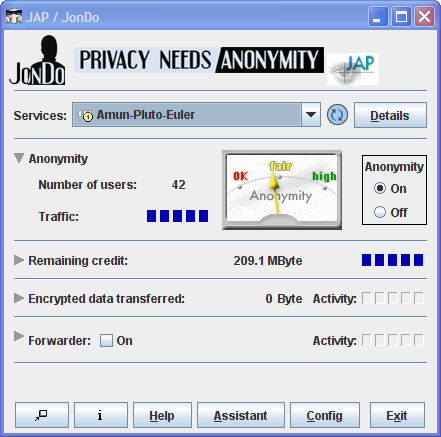
JAP makes it possible to surf the Internet anonymously and unobservably. Without Anonymization, every computer in the internet communicates using a traceable Address. That means the website visited, the Internet service provider (ISP), and any eavesdropper on the internet connection can determine which websites the user of a specific computer visits. Even the information which the user calls up can be intercepted and seen if encryption is not used. JAP uses a single static address which is shared by many JAP users. That way neither the visited website, nor an eavesdropper can determine which user visited which website.


How it works


Instead of connecting directly to a webserver, users take a detour, connecting with encryption through several intermediaries, so-called Mixes. JAP uses a predetermined sequence for the mixes. Such a sequence of linked mixes is called a Mix Cascade. Users can choose between different mix cascades.

Since many users use these intermediaries at the same time, the internet connection of any one single user is hidden among the connections of all the other users. No one, not anyone from outside, not any of the other users, not even the provider of the intermediary service can determine which connection belongs to which user. A relationship between a connection and its user could only be determined if all intermediaries worked together to sabotage the anonymization. more...

The intermediaries (mix providers) are generally provided by independent institutions which officially declare, that they do not keep connection log files or exchange such data with other mix providers. JAP shows the identity and number of organisations in each Mix cascade in detail, and verifies this information by cryptographic means. The users are thus able to selectively choose trustable mix cascades.

Grab your free copy at: http://anon.inf.tu-dresden.de/download_en.html
alternatively: http://download.cnet.com/JAP/3000-2213_4-10671702.html

its small and downloads in seconds!!!

happy browsing anonymously!!!

Friday, May 14, 2010

Using Office 2007 documents in all old versions of Office

Files in the new Office formats often cause problems when they are opened with older versions of the software. Yet not many prefer to buy the new Office package just to work in an “upwardly compatible” way.
You need not buy the new Office package. Microsoft has released the “Compatibility Pack” solely for this purpose. You can download it form the Microsoft Download Center. Please ensure that you have the latest versions of Office XP and 2003 and that all important updates have been installed before you install the tool.
To install the “Compatibility Pack”, start Windows Update or open the link “http://www.microsoft.com/downloads/thankyou.aspx?familyld=941b3470-3ae9-4aee-8f43-c6bb74cd1466&displayLang=en” in the browser and install the available updates. Then, open the “FileFormatConverters.exe” file and finish the installation process.

Tuesday, March 9, 2010

THUNDERBIRD - FEEL THE THUNDER

Mozilla Thunderbird, a free and open source software that can be used for email and news transactions, has been developed by Mozilla Foundation. It is a great tool to manage your emails, as it offers a good number of useful features. The features include better search option and email archiving; you can also open your mails in tabs just the way you open new tabs in Mozilla Firefox.
It is cross-platform software, hence runs on Windows, Linux, Mac and others. For more information visit http://www.mozillamessaging.com/en-US/thunderbird/

KINGSOFT 2009 - The office manager suite

Kingsoft 2009 has been created by Great Worth International Limited. This is basically a cost-effective office suite that offers all the features of a normal office suite. But interestingly, it looks just like Microsoft Office. In other words, you may consider it as a replacement for Microsoft Office. It comes with a writer, a spreadsheet and a presentation software. One of the advantages of this software is that users who have used Microsoft Office at any point of time can easily operated it. Moreover, it supports cross-platforms, hence supports the Microsoft Office files too. It also incorporates a PDF converter. The trial version of this software is available for 100 days. The minimum system requirement for the software is Windows 2000 or higher, 266MHz CPU or higher, 64MB RAM, 80MB hard disk space and IE6.0 or higher. For more information visit http://www.ksoffice.net/

PENCIL - THE ULTIMATE ANIMATOR AND DRAWING FREEWARE

It is a free and open source animation and drawing software that lets you create both traditional hand-drawn animations and vector graphics. The software has been created to enable anyone to make 2D animation. The main website of the software contains a wiki for developers, where you can find how to join the Pencil group, how to get started, documentation on the existing code and a list of tasks that needs to be addressed by the developers. The software can be run on Windows, Mac OS and Linux. For further information, visit http://www.pencil-animation.org/

INKSCAPE-THE VECTOR GRAPHICS EDITOR.

Inkscape is an open source vector graphics editor that is similar to Illustrator, CorelDraw or Xara X. it uses the W3C standard scalable vector graphics (SVG) file format. The software is compatible with XML, SVG and CSS standards. Certain features that Inkscape offers are object creation, object manipulation, styling objects, operations on path, text manipulation, rendering and many others. Using the object creation tool box you can create objects such as rectangle, polygon, circle, etc. you can also create 3D images such as 3D boxes using 3D tool box.


The object manipulation tool lets you move, rotate, scale and skew objects. You can also copy and paste objects on the clipboard. There are styling objects in Inkscape, which lets you fill colours into the created objects. Text rendering in Inkscape is based on the Pango library, which supports complex scripts including Hebrew, Arabic, Thai, Tibetan, etc. the software runs on Linux, Free BSD, Mac OS X and Microsoft Windows. For more information visit http://www.inkscape.org/

avoCADo - an open source 3D modelling software

Avocado is an open source software for 3D modelling, 3D rendering and visualisation. Target users for this software are engineers and artists. Improvements in the latest version include a revolve tool to build menu; you can now reference arcs by unique IDs or sketch new faces after a build operation or select material. It also includes lots of CSG debugging features and an updated graphics.


Avocado has its own wiki, which can be viewed at http://sourceforge.net/apps/mediawiki/avocado-cad/index.php?title=Main_Page. This wiki is basically a tutorial which explains how to use the software. Further, it explains the basic requirements to start the development for the software. Also, source code for the software is available here. The software has been built for cross-platform usage, hence it runs on Linux and Mac OS. For more information visit http://avocado-cad.sourceforge.net/

Open Cascade - The 3D graphics developer

Open Cascade, a software development platform for 3D CAD, CAM and CAE, is supported by Open Cascade S.A.S. It can be used by industries, research institutes, universities or individuals. The fundamental functionality of the Open Cascade technology is modelling data. Any object can be created in 2D or 3D geometry using this software. There are other features too, using which you can create chamfers, draft and offset shapes. An interesting feature of this software is visualisation, which lets you view an object in different modes.


Open Cascade also gives you the freedom to adapt, modify and enrich the code as per your requirements. The software comes with a complete support, for which the user has to pay a nominal fee. But the fee is charged for support, not licence. The software finds applications in various industrial domains, aeronautics and space, automotive, shipbuilding, etc. BMV and TATA Motors use this software in the automobile industry and CIRTES in the medical sector. The minimum system requirement for the software is 256MB, 500MB memory space and OpenGL graphics library. For more information visit http://opencascade.org/

BLENDER-THE ULTIMATE 3D GRAPHICS DESIGNING APPLICATION

Blender is a 3D graphics designing application. This software offers features like modelling, UV unwrapping, texturing, rigging, shading, rendering, particles and simulations, non-linear editing, imaging and compositing, animation, Python scripting, 3D game creation, etc.
Blender has been used in production of animated movies like Elephant Dreams (2005), Big Buck Bunny(2007) and Yo Frankie!(2008). It runs on Windows, Linux, and Mac OS. The minimum hardware requirement of this software is 300MHz CPU, 128MB RAM, 20MB free hard disk space and Open GL graphics card with 16GB RAM. For more information on the software visit http://www.blender.org/

Sunday, March 7, 2010

THE TRUE ENCRYPTOR - TRUECRYPT


A lot of organizations require you to work on sensitive data, such as financial records, database, or proprietary secrets. To ensure that no one can sneak a peek at your files when you’re away from your computer, TrueCrypt can make them simply vanish! A simple keystroke and a password are all you need to ensure the safety of your documents. While it a bit daunting to set up, the comprehensive help and support material available on its website make TrueCrypt a force to reckon with. You can mask folders or entire hard drive partitions so that no one but you will be able to find your information. Choose from a number of encryption algorithms or create a verification keyfile that you can carry on a pen drive. If you want to get truly hardcore, you can even hide an encrypted volume within another encrypted volume for double security.

The download link is given below

AUDACITY - THE FREE AUDIO EDITING THING!!!

Audacity is considered to be one of the best audio editors. It manages to achieve this due to the loads of excellent features it integrates while maintaining the toolbar and work space uncluttered. It can record and play sounds and import and export WAV, MP3, OGG, and AIFF files and also supports 32-bit floating-point audio. Basic effect such as reverb, delay, and compression are also included. Another eye-catching feature is the Best Analyzer, which helps you hold the beats per minute of a phrase.
To edit an audio file, you just need to select the required file. Once selected, it loads onto your screen and now you can edit the file with the aid of the mouse cursor and by keeping the duration scale as a reference. Using the effects tab, a variety of operations can be performed on the selected track after which the file can be saved in the desired audio format. Along with sound editing, audacity also features sound recording, which you can use to record uncompressed or external sounds. Audacity also has a Meter Toolbar added for monitoring volume levels during playback and recording.
The performance of most functions is quick, including tasks such as exporting to MP3 or adding complex effects which demand a large share of the CPU’s resources. Though Audacity doesn’t offer advanced features out of the box, it still stands out of the crowd.

The download link is given below;

IZArc - The File Archiving Freeware


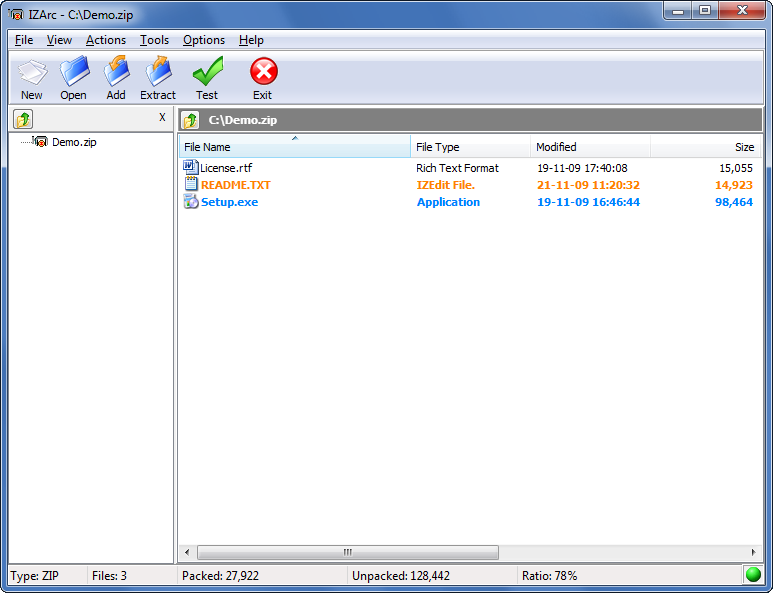
What is the first thing that comes that comes to your mind when Windows warns you of low disk space? Is it something like ‘Wow! It’s time to get a hard drive’ or ‘Oh! No, what do I keep and what do I delete’? if your response is the latter, then help is at hand, you need to use a file archiving application. File archive managers such as Winzip and Winace are quite popular but these are shareware. If it freeware you are looking for, then try IZArc.
IZArc supports a humungous number of file archive format that include ZIP, ACE and RAR. IZArc is quite user-friendly and at the same time packs a reasonable amount of functionalities as well. If you have an archived file of a certain format and need to convert it to some other format, then you can use IZArc to do that as well. However, the number of formats it can convert files into is limited, although it can extract files that are archived in different formats.

The download link is given below

ABI WORD, THE WORD PROCESSING FREEWARE


Word processing is one task which is performed by most computer users. Almost all PCs in the world have been used for word processing. While MS Word is the most commonly used word processor, there are also other free applications that offer comparable performance. AbiWord is a free word processor that offers all the features that you would ever require for word processing. In addition, it does not hog system resources.

If you are a user of MS Word, then using AbiWord wouldn’t make you feel out of place. Most of the features you would use in the former are available in AbiWord. It supports common Word file formats such as DOC and RTF in addition to some of its own unique formats such as ABW and ZABW. The ZABW format is some what similar to the DOCX format in MS Word 2007 wherein the document is in a compressed format hence it takes up less space. AbiWord is not as refined as MS Word or Open Office Writer, but it still has advantages over them because of it being a standalone word processor.

The download link is given below

You can even download it for Linux OS.

FLASHGET - THE ULTIMATE DOWNLOAD DESTINATION

The days when you needed to wait for hours to download a big file using a snail-paced dial-up connection are long gone. With the advent of broadband, downloading files with sizes in GBs has become very easy. FlashGet is one of the best free download managers around.
The DropZone icon graphically represents the rate at which the download represents the rate at which the download takes place and also the percentage of the downloaded file. FlashGet has always been known for its better integration with web browsers, so much so that the Firefox plug-in for integration of third-party download managers is known as FlashGot. It supports quite a number of communication protocols such as HTTP, FTP, BT, MMS, RTSP, and also the popular BitTorrents. Overall, it is a decent download manager and it is also free, giving you more reasons to use it.
The download link is given below.

From the above link, you can download any version of flash get. You can also review the power of this software.